
Description: Printed white dots and blocks
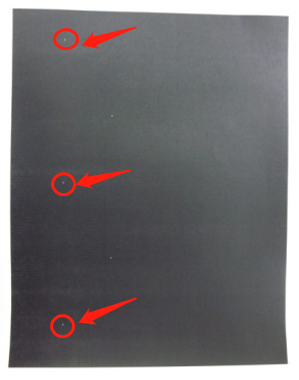
Possible Reasons:
- Defects such as bumps on the charging roller, dents on the developing roller, dents on the feed roller, or poor OPC coating can all cause white spots in printing. The specific consumable’s cycle can be determined by the spacing of the white spots (refer to the defect cycle table).
- Dents caused by damage to the printer’s transfer belt can also result in white blocks in printing.
- Generally, small and minor white spots do not affect normal office printing quality.
Process 1: The problem stopped after replacing the new toner cartridge
Toner cartridge defected.
Process 2: The problem still exsits after replacing the new toner cartridge
Printer problem/batch complaints identification